The quickest way to print your eBird life list is straight from eBird: sign in at ebird.org on a computer, open My eBird and click your total number of species, then click Download (a cloud icon) to save the list as a spreadsheet you print from Excel or Google Sheets, or press Ctrl+P (⌘+P on a Mac) to print the page as it looks on screen. In all there are five ways, from free to keepsake: eBird's Life List page, a spreadsheet of your download, a free printable, a write-in journal and a printed book.
- eBird's own way (free): My eBird, then your Life List, then Download, then print the spreadsheet. eBird's My eBird help page explains viewing and downloading your lists (we read it again on October 8, 2026). Ways 1 and 2 below go step by step.
- Our free printables (free): a printable life list and a printable year list, US Letter PDFs you fill in by hand. No sign-up.
- A printed hardcover book (Birdfolio, ours): we print your eBird download as a hardcover book, with a classic painting or a credited photo for every species, from $79 with US shipping included.
eBird's page, the spreadsheet and the printable cost only paper and ink; a journal costs about $20; a book costs more. Here's what each one costs, how much work it is, and what you end up with.
Key facts
- eBird's help describes your Life List as the total number of species "that you've ever reported to eBird", and lets you filter it by place, date or species (My eBird help, updated March 28, 2025).
- The eBird help pages we read describe viewing, sorting and downloading your lists. They don't describe printing a list, or a printed book.
- Download My Data, in My eBird, gives you a spreadsheet of all your personal eBird records.
- Any web page can be printed from the browser. In Chrome it's Ctrl+P on Windows or ⌘+P on a Mac, with a "Save as PDF" option.
- Two well-known write-in journals: the Cornell Lab's Birder's Life List & Journal ($19.95, paperback) and The Sibley Birder's Life List and Field Diary ($22 list price, paperback).
Facts checked: September 30, 2026, and eBird's help pages again on October 8, 2026.
The five ways at a glance
| Way | Cost | Effort | What you get |
|---|---|---|---|
| eBird's Life List page, printed from your browser | Free | Low: a few minutes | eBird's list as it appears on screen, on plain paper |
| A spreadsheet of your download | Free | Medium: tidy the file first | A plain table, sorted and trimmed your way |
| Our free printable life list | Free | High: you write in every bird | Lined pages for species, date, place and notes |
| A write-in journal | About $20 | High: you write in every bird | A bound paperback in your own handwriting |
| A book printed from your records (Birdfolio, ours) | $79 to $129, US shipping included | Low: add your file, check the preview | A hardcover with a picture, the date and the place for every species |
What are the free ways to print your eBird life list?
Three of the five ways cost nothing but paper and ink:
- Print eBird's Life List page from your browser, just as it looks on screen (way 1).
- Print your eBird download as a spreadsheet, after a little tidying (way 2).
- Print our free printable life list and write your birds in by hand. It's a PDF with no sign-up (way 3).
The first two start from your eBird account; the third needs only a printer.
1. Print your Life List page from eBird (free)
If you keep your list in eBird, it already has a life list for you. Steps 2 to 4 come from eBird's own help page:
- Sign in to eBird on a computer and open My eBird.
- Click your total number of species, or Sightings Lists in the Manage tools, to see every species you've reported.
- To narrow it down, use the globe, calendar or bird icons. They filter the list by place, date or species.
- Click a column heading, such as Date or Location, to sort by that column.
- Print with your browser's own Print command (Ctrl+P on Windows, ⌘+P on a Mac). Choose "Save as PDF" if you'd like a file instead.
Step 5 isn't from eBird: its help doesn't describe printing, and we haven't tested how the page looks on paper. Check the print preview before you print.
Good for: a quick copy today. Less good for: a keepsake. It's a plain list with no pictures, and a long list runs to many pages.
2. Print a spreadsheet of your download (free)
In My eBird, Download My Data gives you a spreadsheet of every record you've submitted. Our guide shows each screen: how to download your eBird data.
The file, MyEBirdData.csv, has a row for every species on every checklist, so a bird you see often appears many times. To turn it into a life list:
- Open a copy of the file in Excel or Google Sheets.
- Sort by date, oldest first.
- Remove duplicates using the species name column only. Microsoft says Excel keeps the first of each, which after sorting is your first sighting.
- Hide the columns you don't need, then print.
Our guide to turning a list into a spreadsheet walks through the sorting in more detail.
Only want part of your list, such as one state or one year? eBird's Sightings Lists page has a Download button for just the records you've filtered.
Use the Merlin app? Birds you save in Merlin while signed in with your eBird account come with this download too: how to export your Merlin life list.
Good for: anyone comfortable with spreadsheets. The file doubles as your backup: here's how to back up your birding records.
3. Our free printable life list (free)
If you'd rather write it by hand, print our life list at home. It's two US Letter pages: 28 numbered lines on the first, and a second page of 30 lines that you can print as often as you need. Each line has room for the species, the date, the place and a note. There's no sign-up.
Download the printable life list (PDF). A year-list version is on our guide to keeping a lifetime bird list. Both printables are also on our page of free birding tools and printables, with free tools that count and check your list.
Good for: someone who likes pen and paper, or a new birder starting out.
4. A write-in journal (about $20)
A life-list journal is a bound book you fill in by hand. Two well-known ones:
- Birder's Life List & Journal, from the Cornell Lab of Ornithology (Princeton University Press, 2019): a 264-page paperback, $19.95 at Annie Bloom's Books.
- The Sibley Birder's Life List and Field Diary (2017): a 304-page paperback, $22 list price at Penguin Random House. It has entries for 923 species of the US and Canada, with room for where and when you saw each one.
Prices were checked on September 30, 2026, and may change.
Good for: someone who enjoys writing things down. If you enjoy writing by hand, a journal is the better gift.
5. A book printed from your records (Birdfolio, ours)
This one is ours, so we'll keep it short. Birdfolio reads your eBird download, an iNaturalist export or a typed list, and prints a hardcover book, 8.5 × 11 inches. Every species on your list gets a classic painting or a credited photo (about 7 in 10 are paintings), with the date and place you first saw it. The book also marks your milestones, maps the places you've birded and ends with an index.
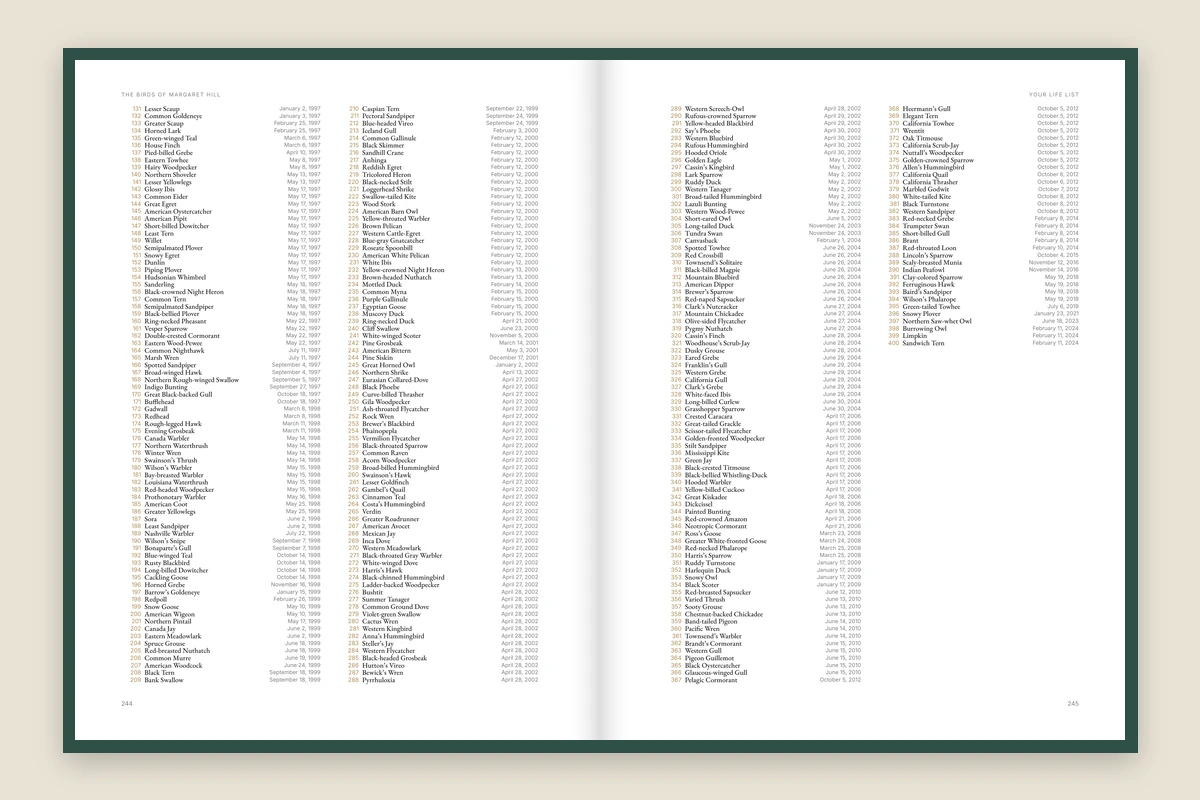
- Prices: $79 for lists up to 300 species, $99 up to 1,000, and $129 above that, US shipping included. Express shipping is $30 more.
- Orders open November 15, 2026, for US addresses only.
- Delivery: Standard shipping usually takes about 2 to 3 weeks from your order, or about 3 to 4 weeks in November and December.
- You see a free preview of your book before you pay, and you don't need an account.
Good for: a keepsake or a gift for someone with years of records. Less good for: a list that changes every week. A book is a snapshot of your list on the day you make it.
Look inside a life list printed as a hardcover, or see your own list as a book.
Which should you choose?
- Want it on paper today, for free? Print eBird's Life List page, or your spreadsheet.
- Enjoy writing by hand? Use our free printable, or buy a journal.
- Want a keepsake with pictures, or a gift for a longtime birder? A printed book.
Whatever you choose, keep your data file too. Paper is a lovely copy, but the file is what you keep adding to.
What about a poster? When we searched in September 2026, we also found free tools and small shops that turn a life list into a poster. We haven't tried them, so we don't name or compare them here.
How do I see my life list on eBird?
Sign in at ebird.org, open My eBird and click your total number of species, or Sightings Lists in the Manage tools: that's your Life List, every species you've ever reported to eBird. On a phone, tap Manage first. eBird's help says you can then:
- filter the list by place, date or species, with the globe, calendar and bird icons
- switch between the first and the most recent time you reported each bird
- click a place in the Location column to see your life list for just that place
Birds you saw before you started using eBird can be added too. eBird's help page Enter your pre-eBird life list explains how, with a "List-building Checklist": it counts toward your own records but stays out of eBird's public data. We read both help pages on October 8, 2026.
How can I download my data from eBird?
In My eBird, click Download My Data in the sidebar (on a phone, tap Manage first), and eBird sends you a spreadsheet of all your personal eBird records. Our step-by-step guide shows each screen: you press Request My Observations, and eBird emails you a link to a .zip file with MyEBirdData.csv inside. We checked those steps on September 30, 2026.
To download only part of your list, such as one state or one year, filter your Sightings List first, then click the cloud icon or Download. You don't need the "eBird Basic Dataset": eBird's help describes it as the raw observations from all eBird users, offered after a short project description form (Download eBird data, read October 8, 2026).
Which is better, Merlin or eBird?
Neither is better: they do different jobs, both come from the Cornell Lab of Ornithology, and one free Cornell Lab account works for both. Merlin is a free app that helps you identify a bird from a photo, its sound or a description. eBird is where you report checklists of the birds you see, and it keeps your life lists. eBird's help says the birds you save in Merlin stay private, and that if you already use eBird, you should keep reporting your sightings there.
For printing, it makes no difference. We tested it on October 3, 2026: birds saved in Merlin, signed in with the same account, came with the eBird download. Here's how to export your Merlin life list.
Can you print your eBird life list from a phone?
Yes, though a computer is easier. eBird's help says that on a phone, the My eBird tools are under the Manage button:
- Open ebird.org in your phone's web browser and sign in.
- Tap Manage, then your total number of species or Sightings Lists.
- Tap the cloud icon or Download to save your list as a spreadsheet.
To print from an iPhone, Apple's steps are: tap the Share button, scroll down and tap Print, then choose your printer. It needs a printer that supports AirPrint, on the same Wi-Fi network as your phone. On other phones, the steps depend on your browser and printer. If printing from the phone is a struggle, email the spreadsheet to yourself and print it from a computer.
Does eBird print a book of your life list?
Not that we found. eBird's help pages describe viewing, sorting and downloading your lists, and none of the pages we read mentions a printed book. We checked again on October 8, 2026.
Birdfolio is not affiliated with eBird, the Cornell Lab of Ornithology or iNaturalist.